 Hydra Vision Learn
Tool · Test & Optimise
Replay: any grid, bar by bar.
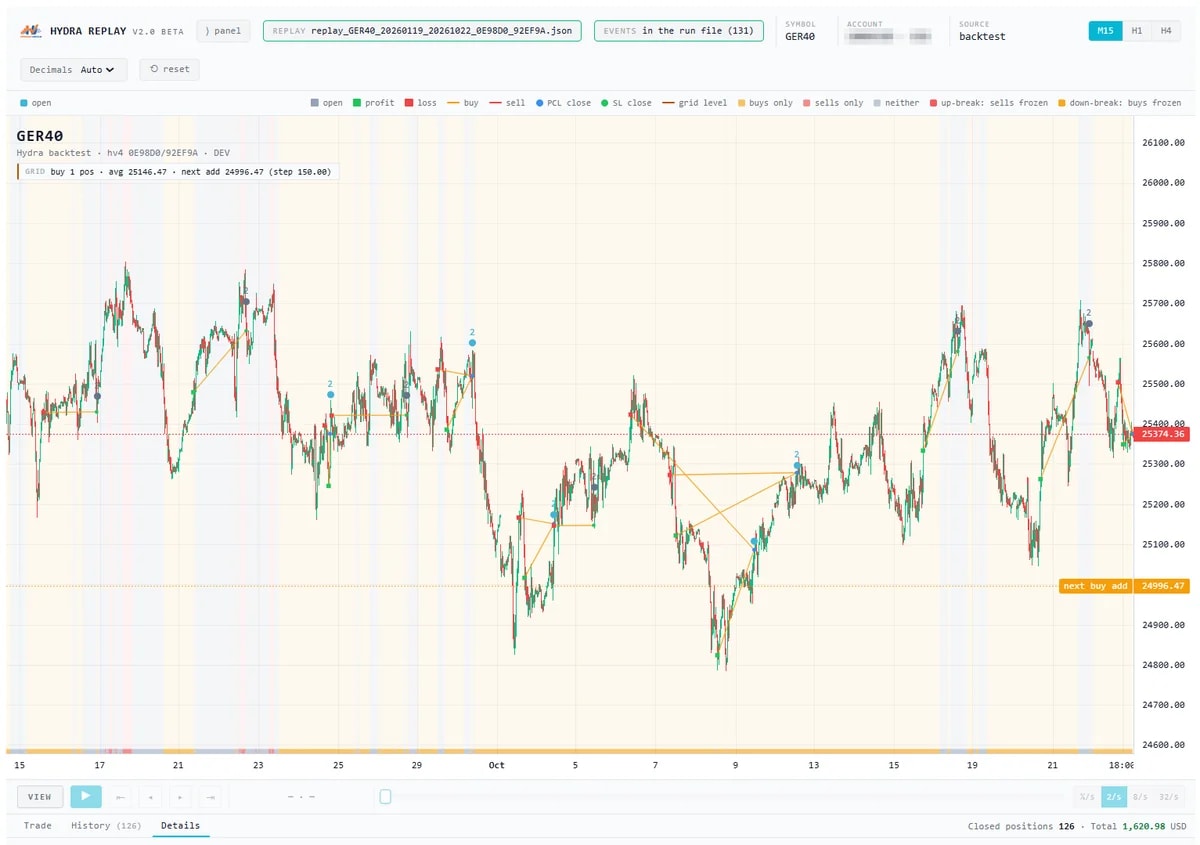
Hydra Replay turns a backtest into a chart you can study or play back like a recording. The Strategy Tester report tells you what the result was; Replay shows how the grids got there.
The problem it solves
A summary figure such as maximum drawdown does not show the grid behind it: where the anchor opened, how the levels were added, when SmartEntry waited and which PCL close brought the grid down. MetaTrader's visual tester can show a run, but not which engine acted or why.
What you see and do
With the replay export switched on, a backtest writes a replay file: the candles, every position opened and closed, and the grid events behind them. You drop the file onto the player in the portal. It has two modes:
- View: the whole backtest at once. Sort grids by drawdown or depth, and inspect any position or event.
- Replay: the backtest plays forward candle by candle, with a trade and history list underneath. Outcomes stay hidden until they happen.
The chart shows the first characters of the Strategy Print and Tuning Print that ran, so a replay can be matched to its setfile. You can switch between M15, H1 and H4 candles.
Hydra Replay is in beta. You request access from the Hydra Replay page in the portal before your backtests can write replay files.
Which plan includes it
Both the Free Trial and the Subscription. Compare the plans.
See it on a demo account. The trial is free for 14 days, with no credit card.
Start 14-day trial