 Hydra Vision Learn
Tool · Live & Publish
Configuration Timeline: what ran, and when.
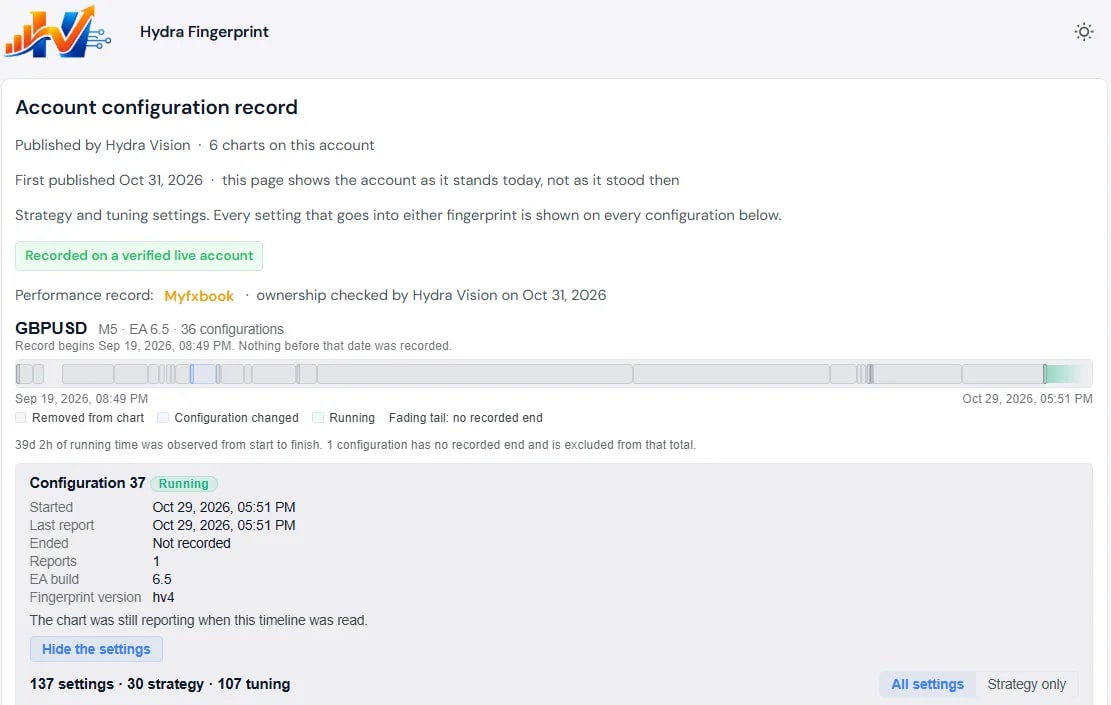
The Configuration Timeline shows every configuration each of your live charts ran, when it started and when it changed. Nothing is removed.
The problem it solves
A live record on its own does not say which settings produced it. Settings get changed on a Tuesday, or was it Wednesday, and a few weeks later nobody can say which part of the record belongs to which configuration. Anyone else looking at the record has even less to go on.
What you see and do
You switch on Chart Configs for a live account in the portal, accept its terms and request access. Once it is approved, the EA reports each chart's configuration and Hydra Agent delivers it. Nothing from before that point is recorded.
- One timeline per chart. Each block is one configuration. A block ends when the settings change, or when the EA is removed or the chart is closed.
- Strategy and tuning. A change to the settings in either the Strategy Print or the Tuning Print starts a new block, so the timeline can tell when a chart truly changed configuration.
- The settings behind each block, one click away.
- Gaps are shown. If a chart stops reporting for more than two days, the timeline marks where reporting resumed.
You can keep the timeline private, or publish the whole account as a read-only public page with a link to your independent Myfxbook or FXBlue record. You choose how many settings to disclose, and settings outside both prints, such as your keys and display options, are never shared. To publish a single setfile version instead, see Hydra Fingerprints.
Which plan includes it
The Subscription, on live accounts, as part of Chart Configs. Compare the plans.
See it on a demo account. The trial is free for 14 days, with no credit card.
Start 14-day trial