 Hydra Vision Learn
Tool · Configure & Learn
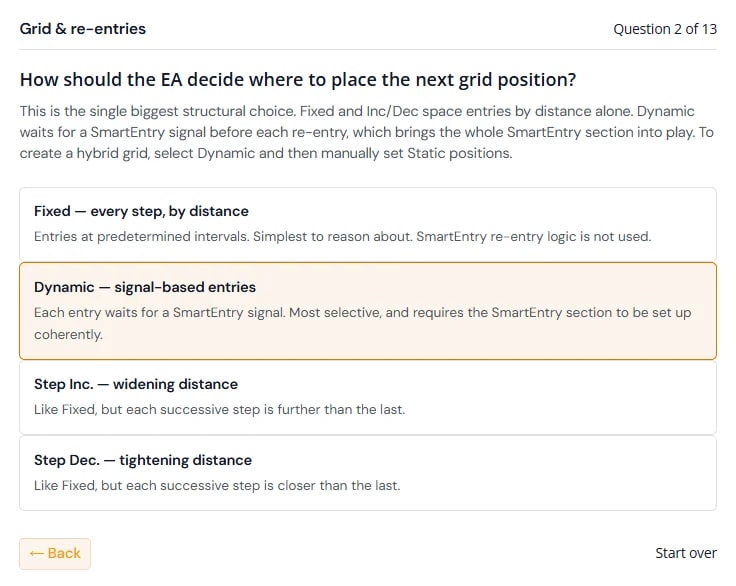
Rules wizard: one question at a time.
The Rules wizard is the guided way to start a setfile in the Setfile Builder. It asks about the key design decisions of a Hydra Vision strategy and turns your answers into settings.
The problem it solves
Many settings only matter if an earlier choice switched them on. Facing all of them at once makes it hard to see which decisions come first. The wizard puts them in order and skips the ones that do not apply to you.
What you see and do
- One question at a time. Each is a yes or no, or a choice from a list, such as how the EA should decide where to place the next grid position (the Grid Strategy).
- The reasoning. Each answer explains what it means for the strategy, so you learn the EA as you configure it.
- Only relevant questions. Your earlier answers decide which questions follow.
- Back and forth. Move backwards and forwards before you confirm.
When you confirm, you name the setfile and it is saved as version 1, with its Strategy Print and Tuning Print. The setfile opens for review. Settings that need a value from you, such as step sizes, volumes and risk zones, start at their defaults: we do not advise on price, volume or asset settings, so test them before you rely on them. The Asset Profiler can help you choose a starting step.
Which plan includes it
Both the Free Trial and the Subscription. Compare the plans.
See it on a demo account. The trial is free for 14 days, with no credit card.
Start 14-day trial