 Hydra Vision Learn
Tool · Test & Optimise
Settings Diff: exactly what changed.
Settings Diff answers one question about a set of backtests: which settings were different? It reads the settings each run was tested with and shows only the ones that vary.
The problem it solves
After a round of testing, two runs can look very different and nobody remembers why. Was it the step, the volume, a veto someone switched on? With more than 170 settings per run, finding the difference by eye is not realistic. Compare shows how the results differ; Settings Diff shows which settings caused the runs to be different in the first place.
What you see and do
Pick up to 100 of your backtests, one by one or a whole test group at once. Settings are shown by their names in the portal, not by input codes. There are three views:
- Matrix: every setting that differs across the runs, side by side, with each run's headline results.
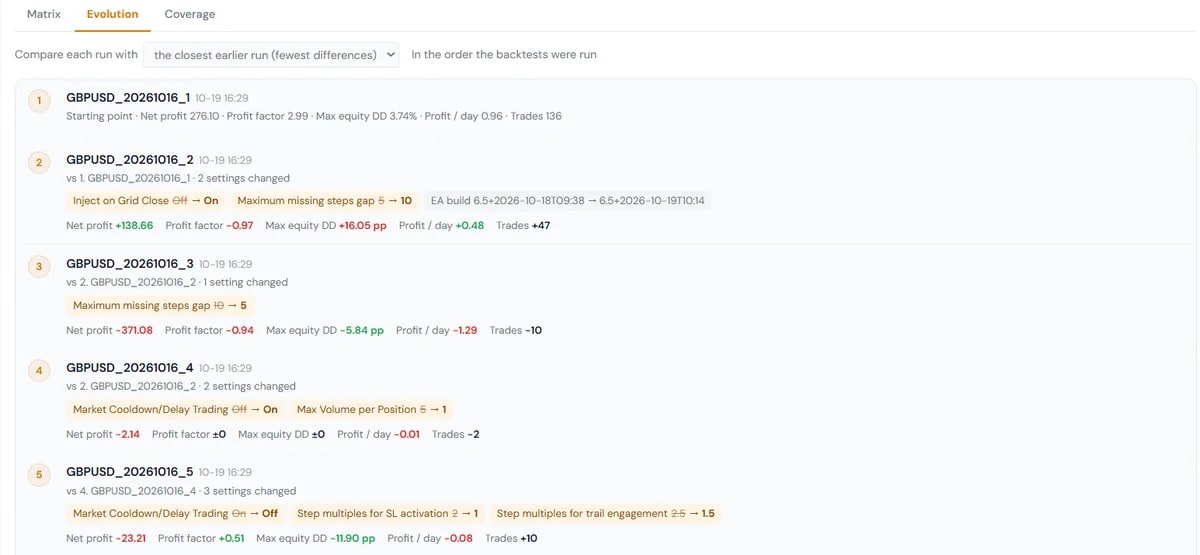
- Evolution: run by run, what changed compared with an earlier run: the closest one (fewest differences), the one just before, or a baseline you choose.
- Coverage: for one setting, each value you tested, which runs used it, and the range of a result across them.
Settings Diff reads the settings recorded in each backtest report. To compare two saved setfile versions before you test them, use the compare view in the Setfile Builder.
Which plan includes it
Both the Free Trial and the Subscription. Compare the plans.
See it on a demo account. The trial is free for 14 days, with no credit card.
Start 14-day trial