 Hydra Vision Learn
Tool · Test & Optimise
Backtest Analysis: every grid, measured.
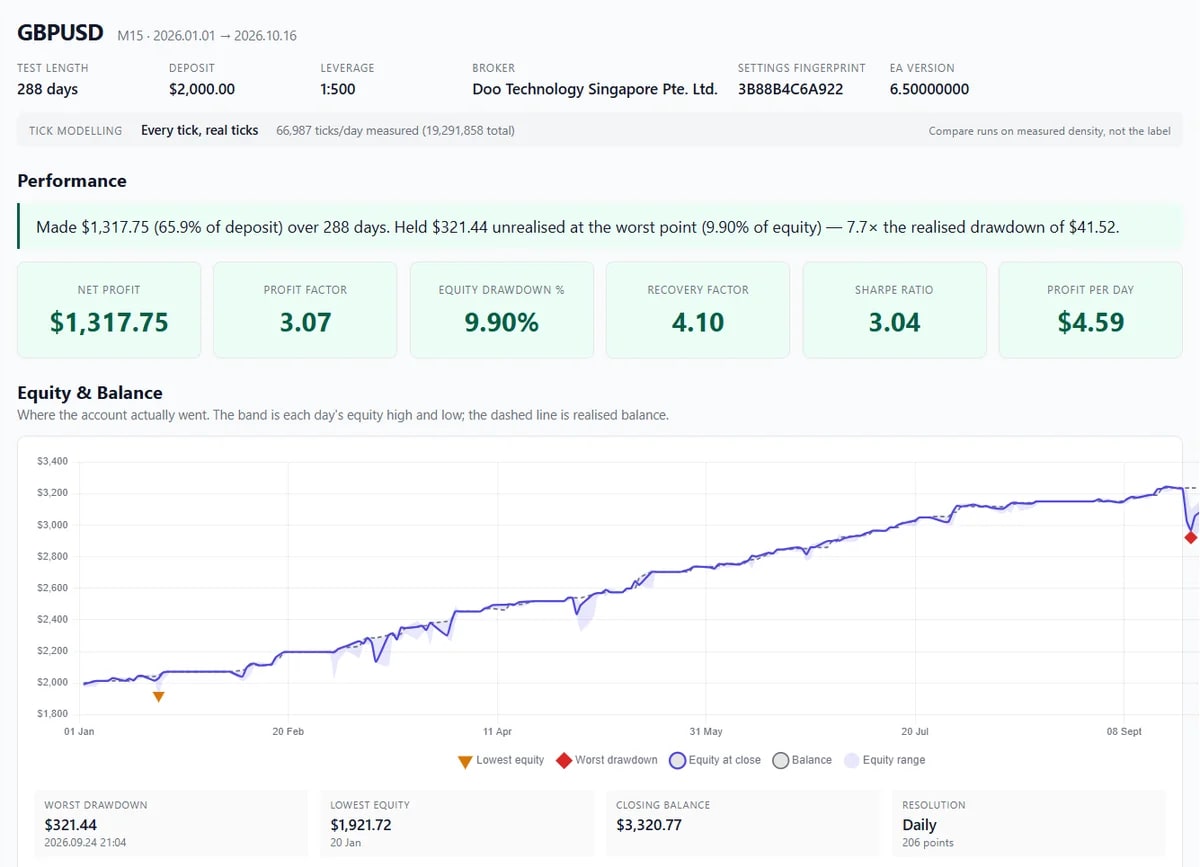
Backtest Analysis is where your Hydra Vision backtests live. Upload a backtest and every grid in it is measured: how deep it went, how it closed, and how far equity fell along the way, not only where the balance ended.
The problem it solves
MetaTrader's Strategy Tester report treats every deal as a separate trade. It cannot tell which engine closed a position, how a grid developed or why. A final balance can hide a deep drawdown on the way. And once you have run dozens of tests, it is hard to remember which settings produced which result.
What you see and do
- Upload. With Export Backtest Report switched on in the setfile, the EA writes a report file at the end of each backtest. You upload it to the portal and give it a name.
- Linked to its setfile. The report carries the Strategy Print and Tuning Print of the settings that ran. The portal matches them to your saved setfile versions, shows whether the match is exact or strategy-only, and can rebuild a setfile from the report if none matches.
- Every grid measured. The report viewer reads what GridSense recorded: grid depth, how each grid closed and by which engine, costs, and equity drawdown, not only balance.
- Organised. Tag, annotate, filter and sort runs by symbol, prints or tags.
From here you can open runs in Compare, Settings Diff and Portfolio, or play a grid back in Replay.
Which plan includes it
Both the Free Trial and the Subscription. Compare the plans.
See it on a demo account. The trial is free for 14 days, with no credit card.
Start 14-day trial